


AT4K Launcher
4.861.00 Reviews
App Specs
- Version
- 1.2
- Updated On
- License
- Free
- Downloads
- 50,000+
- Developer
- Cute Little Apps
- Categories
- Personalization
- Platform
- Android
Screenshots
 Analysis by AppCompare
For a household that shares an Android TV, the launcher is the part everyone meets first. It can make the difference between handing over the remote and having to explain where everything went. AT4K Launcher is aimed at a tidy, direct home screen, and that focus makes it worth considering when you want a TV interface that feels less busy than a phone-style grid.
A shared screen needs a simple starting point
I find a clean launcher most useful when several people use the same television for different reasons. One person may open a streaming app, another may want a game, and someone else may only need to find the settings. A less cluttered layout can reduce the little handoff delays: rather than scanning a crowded screen, the next person can focus on the apps they recognize.
That benefit depends on how your household uses the TV. If everyone already knows where their usual apps are, a minimal home screen can feel pleasantly calm. If people rely on lots of visible shortcuts or expect the launcher to organize content automatically, a sparse layout may instead mean extra navigation. I would treat the clean presentation as a way to reduce visual noise, not as a promise that every task takes fewer clicks.
Make the first setup a shared decision
Because a launcher changes the screen people return to, I would set it up with the regular users in mind rather than tailoring it only to the person who installs it. Agree on which apps should be easy to reach, then give the remote to another household member and see whether they can find a familiar destination without coaching. That quick test can reveal whether your preferred arrangement is genuinely clear to everyone.
It is also sensible to distinguish between a clean screen and a private account. Hiding an app can keep it out of casual view, but I would not treat that as account security or as a substitute for checking who is signed in inside the app itself. On a shared television, review the accounts and profiles in the individual services as well as the launcher layout. The launcher can shape what is visible at home; it does not, by itself, establish boundaries between viewers.
Where a minimal launcher fits
Compared with a typical device launcher that emphasizes recommendations, content rows, or a large number of shortcuts, AT4K Launcher’s appeal is its restrained, straightforward feel. That can suit a television used mainly to open a handful of familiar apps. The trade-off is that people who enjoy browsing suggestions or want a densely personalized dashboard may prefer their device’s built-in home screen or a more feature-heavy alternative.
I would also keep expectations practical: changing the launcher changes the route into your apps, not what those apps contain or how they manage profiles. If the main household problem is that people cannot tell which streaming account is active, the better fix is to check the service accounts directly. If the issue is simply a busy starting screen, a simpler launcher is a more relevant experiment.
Worth Reading Before You Choose

EA SPORTS FC Mobile 26 Is a Bigger Football Game, but It Takes Time

Flipboard Shows What News Apps Must Do Beyond the Feed

Switching to Android Auto Means Rethinking Your Driving Routine

Google Calendar Makes a Crowded Week Easier to Manage

Ludo King Makes the Most of the Minutes Between Plans

Baby Panda World Brings Quick Play to Modern Phones, but Its Game Library Feels Busy
First Impressions of AT4K Launcher
So, I dove right in and installed the AT4K Launcher. Right off the bat, the setup process was a breeze. You know how some launchers bombard you with a gazillion options right from the get-go? Not this one. It gently guides you through the initial setup, making it feel like a friendly chat rather than a tech lecture.
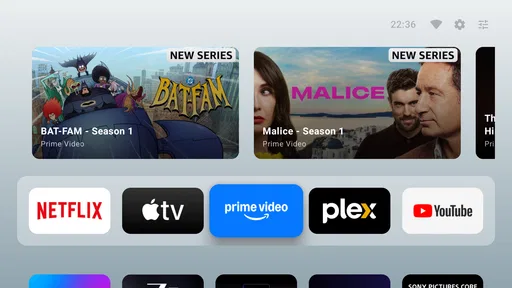
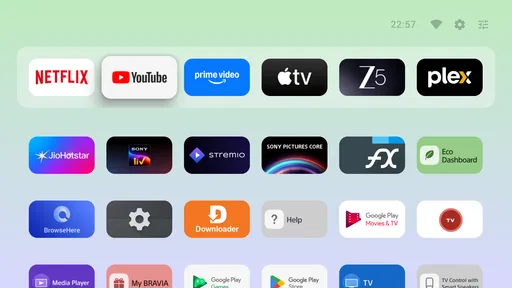
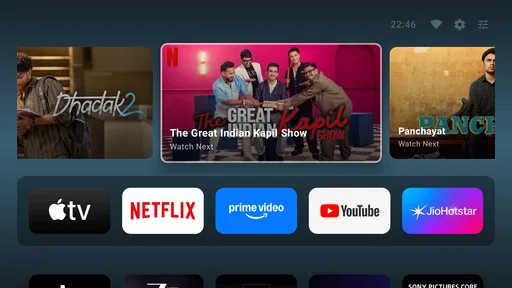
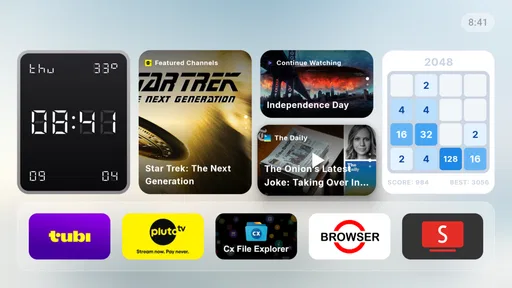
The home screen layout is refreshingly clean. Icons are neatly arranged, and the overall look is very modern. I couldn’t help but notice how fluid the transitions were as I navigated through different screens. It felt like my phone was suddenly turbocharged.
Customization and Features
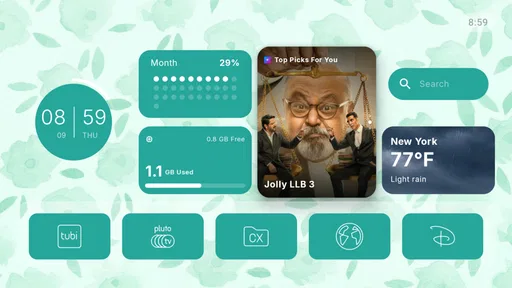
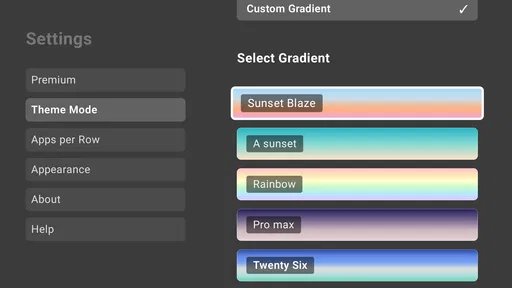
Now, let’s talk about customization because, let’s face it, that’s where a launcher really struts its stuff. The AT4K Launcher doesn’t disappoint. You’ve got a slew of options to tweak the look and feel of your device. From changing icon sizes to playing around with different themes, it’s all about making your phone truly yours.
One of my favorite features is the ability to hide apps. I mean, we all have those apps that we use but don’t necessarily want on display, right? With just a few taps, you can keep them tucked away neatly. It’s like having a secret drawer for your apps.
Performance and Usability
Performance-wise, the AT4K Launcher is a champ. I didn’t experience any lag or stutters, which is a big plus. It’s optimized for speed, ensuring a smooth user experience. The quick access panel is another handy feature. Swiping up from the bottom gives you instant access to your most-used apps and settings. It’s like having a magic wand for your phone.
On the usability front, everything feels intuitive. Even if you’re not tech-savvy, you’ll find yourself navigating the launcher with ease. The gestures are responsive, and the app drawer is straightforward, making it easy to find what you need in a jiffy.
Final Thoughts
So, what’s the verdict? The AT4K Launcher is a game-changer for anyone looking to jazz up their phone’s interface while keeping it functional. It strikes a beautiful balance between style and substance, making it a worthy addition to your app arsenal.
Whether you’re a customization junkie or someone who just wants a simple, efficient launcher, this app has something to offer. And hey, it doesn’t hurt that it looks good while doing it. So, if you’re ready to give your smartphone a fresh new look, the AT4K Launcher might just be what you’re looking for.
Who should try it, and what to check first
I would put this in the “try it if the home screen is the problem” category. It is a free personalization app from Cute Little Apps, and its Android TV focus makes it more relevant to a television setup than to someone shopping for an elaborate phone launcher. The audience signal is encouraging but still modest: it has a 4.8 average from around a hundred ratings and over ten thousand installs. That gives a prospective user some reassurance, though it is not a substitute for checking whether the interface suits their particular device and household.
Before switching, I would note how you currently return to the home screen and which remote controls you use most. Then try the launcher for the routine that matters: returning from a show, opening a familiar app, and finding settings. If those actions feel clearer, the change is doing useful work. If the built-in launcher already gets everyone where they need to go, there may be little reason to change a familiar setup just for a different look.
Small choices that make the screen easier to live with
For shared use, app hiding is best treated as decluttering rather than a way to create separate spaces. I would hide only items that do not need to be a shared shortcut, then ask another viewer to locate a commonly used app. If they have to hunt through the drawer every time, the cleaner screen has shifted effort onto them. A practical compromise is to keep household staples visible and reserve hiding for rarely opened apps or items that would otherwise distract from the main choices.
Icon size is another setting worth approaching as a usability decision, not just decoration. On a television viewed from across the room, a larger target may be easier to recognize and select, while fitting fewer items in view. On a smaller display or for someone comfortable navigating compact grids, smaller icons can make the home screen feel less crowded. I would change one thing at a time and live with it through ordinary viewing rather than repeatedly redesigning the screen in one sitting.
The quick access panel can also help with a predictable routine, but it works best when the household agrees what belongs there. If each person expects a different set of favorites, a shared shortcut area can become less helpful than the app drawer. Try it with a short, stable group of frequently used destinations; avoid treating it as a complete replacement for learning where the rest of the apps live.
Age context and trust on a common television
The app is rated for Everyone, which makes it broadly suitable as a launcher for a general audience. That rating describes the app’s age suitability, not the content or account settings of the streaming services opened through it. For a child using the television, I would still check the controls and profiles inside each service and make sure the remote returns to the intended account. A tidy launcher can make navigation friendlier, but it should not be mistaken for parental controls.
The same distinction matters for adult guests or roommates. A hidden icon may be less noticeable on the home screen, but it does not sign anyone out or prevent someone from opening an app through another route. If account separation matters, handle it at the service level and confirm the active profile before leaving the TV. This is a small habit, but it addresses the actual privacy question more directly than rearranging icons.
Compatibility, cost, and the decision to switch
The current version is 0.941, and the app requires Android 8.1 or later. I would check the television’s Android version before planning a household change, especially if the device has been in use for a long time. The app is free to install, with in-app purchases listed at $4.99 per item, so I would explore the everyday launcher experience first and only consider a purchase if a specific paid option is clearly useful to you.
As a category, launchers sit between the device’s default home screen and a more heavily customized interface. The default is usually the safest choice for people who value familiarity and integrated recommendations; a feature-rich launcher can suit someone who wants extensive control and is willing to maintain it. AT4K Launcher makes more sense in the middle for a household seeking a calmer starting point without turning setup into a hobby. If you want deep account management, automatic household profiles, or content discovery, this is not the tool I would choose to solve that need.
My household verdict is simple: I would try it when the shared TV’s starting screen feels noisy and the people using it agree on a few easy-to-find destinations. I would keep the built-in launcher when recommendations and existing habits matter more, and I would manage age limits and account privacy inside the relevant services either way. Its strongest case is not that it changes how a television works, but that a thoughtfully arranged, uncluttered entry point can make everyday handoffs a little less frustrating.
Pros
- Highly customizable interface options.
- Supports a wide range of icon packs.
- Fast performance with minimal lag.
- User-friendly layout for easy navigation.
- Frequent updates with new features.
Cons
- Limited free features; many are premium.
- Requires higher RAM for smooth operation.
- Some features may be overwhelming for beginners.
- Occasional ads in the free version.
- Theme options could be more diverse.
FAQs for AT4K Launcher
What is AT4K Launcher and who is it for?
AT4K Launcher is a customizable home screen launcher designed for Android devices. It offers a sleek and user-friendly interface, making it ideal for users who want a more visually appealing and efficient way to navigate their device. It's particularly suited for those who enjoy personalizing their home screens with themes and widgets.
How does AT4K Launcher enhance my device’s performance?
AT4K Launcher is optimized to use minimal system resources, ensuring that your device runs smoothly without unnecessary lag. It offers quick access to apps and settings, helping to improve overall efficiency. Its lightweight nature makes it an excellent choice for both older and newer devices.
What customization options are available in AT4K Launcher?
AT4K Launcher provides extensive customization options, including a variety of themes, icon packs, and widgets. Users can personalize the layout, adjust icon sizes, and apply transition effects, allowing for a truly unique home screen experience. This flexibility caters to both minimalists and those who love vibrant designs.
Is AT4K Launcher compatible with all Android devices?
AT4K Launcher is compatible with most Android devices running a recent version of the operating system. However, it’s always recommended to check the app’s requirements in the Google Play Store to ensure compatibility with your specific device model and OS version before downloading.
Are there any in-app purchases or ads in AT4K Launcher?
AT4K Launcher offers a free version with essential features, but it may include ads. For users seeking an ad-free experience and additional advanced features, there is typically a premium version available for purchase. This allows users to enhance their experience according to their preferences and budget.


